
WARNING: The TrackAbout MetaWiki has been deprecated and is no longer being updated.
Please visit our new TrackAbout Knowledge Base at https://supportkb.trackabout.com for the most-up-to-date documentation on TrackAbout and TrackAbout Mobile.
en
Jump to navigation
Jump to search
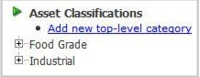
Add New Category

- Go to the Asset Classifications page
- (Type “Asset Classifications” in the Jump To box or use the left menu bar and go to TrackAbout Config > Asset Classifications)
- Click on Asset Classifications (next to the green arrow)
- Click Add New Top-Level Category
- Type in the name of the category and click Save