
WARNING: The TrackAbout MetaWiki has been deprecated and is no longer being updated.
Please visit our new TrackAbout Knowledge Base at https://supportkb.trackabout.com for the most-up-to-date documentation on TrackAbout and TrackAbout Mobile.
Difference between revisions of "Navigation"
Jump to navigation
Jump to search
(Created page with "== Quick Search Box == *Contains a set of text fields where you can search using different identifiers. The default fields in this section are: **Jump To: Allows you to search...") |
|||
| Line 1: | Line 1: | ||
== Quick Search Box == | == Quick Search Box == | ||
| + | [[File:TA Training P2-1.png|right|alt=Navigation bar on TA Corp webpage.|The Wikipede edits ''[[Login]]''.]] | ||
*Contains a set of text fields where you can search using different identifiers. The default fields in this section are: | *Contains a set of text fields where you can search using different identifiers. The default fields in this section are: | ||
**Jump To: Allows you to search for any page listed in the submenus | **Jump To: Allows you to search for any page listed in the submenus | ||
| Line 9: | Line 10: | ||
| − | [[File:TA Training P2-1.png| | + | ==Top Navigation== |
| + | *Located at the top right section of the TrackAbout website, a group of buttons takes you to frequently used pages: | ||
| + | **My Prefs: Contains pages to change your personal settings | ||
| + | **Help/Wiki: This button drops down a search box that also contains a link to the TrackAbout Wiki where you can find additional support on many topics | ||
| + | **Contact Support: This button drops down a menu containing all the information you will need to contact the TrackAbout support team | ||
| + | **Logout: Logs you out of TrackAbout | ||
| + | == Quick Search Box == | ||
| + | [[File:TA Training P2-1.png|none|alt=Navigation bar on TA Corp webpage.|The Wikipede edits ''[[Login]]''.]] | ||
Revision as of 09:58, 21 June 2013
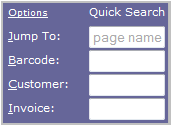
Quick Search Box

- Contains a set of text fields where you can search using different identifiers. The default fields in this section are:
- Jump To: Allows you to search for any page listed in the submenus
- Barcode: Allows you to search for an asset by barcode
- Customer: Allows you to search for a customer by Customer ID
- Invoice: Allows you to search for delivery tickets using an invoice number
- Hint: Typing the first letter of any search box name will automatically put your cursor into it so you can begin typing your search term
- You can change which fields are displayed in the Quick Search Box in the My Preferences page
- Located at the top right section of the TrackAbout website, a group of buttons takes you to frequently used pages:
- My Prefs: Contains pages to change your personal settings
- Help/Wiki: This button drops down a search box that also contains a link to the TrackAbout Wiki where you can find additional support on many topics
- Contact Support: This button drops down a menu containing all the information you will need to contact the TrackAbout support team
- Logout: Logs you out of TrackAbout
Quick Search Box