
Please visit our new TrackAbout Knowledge Base at https://supportkb.trackabout.com for the most-up-to-date documentation on TrackAbout and TrackAbout Mobile.
Ownership
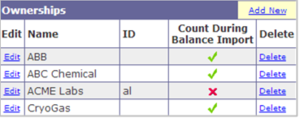
Ownerships
In TrackAbout, ownership refers to who owns a particular asset. This is used to keep track of vendor and customer owned assets, as well as of company owned assets.

View Ownerships
- Go to the Ownerships page
- Type “Ownerships” in the Jump To box
- Use the menu bar and click on TrackAbout Config > Ownerships
- On this page you can view, add and edit ownerships
Adding New Ownerships
Adding Individual Ownerships
- Go to the Ownerships Page
- Type "Ownerships" in the Jump to Box.
- Use the menu bar and click on Trackabout Config > Ownerships
- Click Add New
- Enter the ownership name
- Leave the “Count assets with this ownership” box checked
- Choose an Ownership Type:
- Company-Owned: Owned by Your Company
- Vendor-Owned: Owned by an outside vendor
- Click Save

Adding Ownerships in Bulk
There is now a tool to load your Ownerships in bulk so that you don't have to work through them individually. This is done on the website via the Bulk Load Ownerships page.
The page provides detailed instructions about how to:
- download an excel template which will include any ownerships already in the system
- how to update the excel template
- how to upload the new Ownerships
Ownership Pointers: Adding ownership allows you to keep track of assets by who owns them. Ownerships can also be set to Offline, which will remove the ownership choice from any list on the device or website.