
WARNING: The TrackAbout MetaWiki has been deprecated and is no longer being updated.
Please visit our new TrackAbout Knowledge Base at https://supportkb.trackabout.com for the most-up-to-date documentation on TrackAbout and TrackAbout Mobile.
Users
Jump to navigation
Jump to search
Anyone who will be using TrackAbout, whether they are delivering cylinders, filling them, or accessing the TrackAbout website needs to be set up as a user. This will help you keep track of who made certain deliveries or edits to records on the website.
View Users
- Go to the Internal Users page
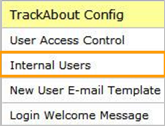

- Type “Internal Users” in the Jump To box
- Use the menu bar and click TrackAbout Config > Internal Users
- On this page, you can see a list of all the users that are currently in TrackAbout, along with their basic permissions
- You can also Add, Edit or Delete users from this page

Add New Users
Go to the Internal Users page
- Type “Internal Users” in the Jump To box
- Use the menu bar and click TrackAbout Config > Internal Users
- Click on the Add New User link
- Enter User Information
- Choose whether or not they have Mobile Unit Access (TAMobile Rugged)
- Choose the Mobile Role the user will have access to
- Choose whether or not they have Web Access
- If the user has an email address:
- Enter the email address in the box
- Leave the Welcome Email box checked
- If the user does not have an email address:
- Enter a Login Username in the box
- Enter and confirm a password for the user
- Specify whether the user has access to all locations or only specific locations
- Select what website roles the user should have
- Regular User: has limited access
- System Admin: has full access
- Click Save New User
