
Please visit our new TrackAbout Knowledge Base at https://supportkb.trackabout.com for the most-up-to-date documentation on TrackAbout and TrackAbout Mobile.
Use States
What are Use States?
A Use State describes the status or condition of an asset. For example, assets at a customer would have a use state of "Delivered", while assets that are ready for delivery would have a use state of "Ready for Use". All unique (barcoded) assets in TrackAbout have a use state assigned to them, as long as they are not retired, junked or lost. The use state on an asset can change every time it is scanned in an action.
Why use Use States?
Used with the reports available in TrackAbout, use states provide another level of insight into your asset inventory by showing how many assets are in each step of the asset life cycle. In some TrackAbout modules, use states are also used to force assets to go through a specific process by by only allowing assets with certain use states to be valid for certain actions.
Finding Use States
The use state of an asset can be viewed on both the TrackAbout website and in the asset lookup feature on any of the TrackAbout Mobile platforms (TAMobile 6, TAMobile Android, TAMobile iOS).
Use States on the Website


Use States on Mobile Platforms
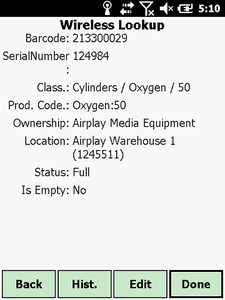
Use State shown as Status in TAMobile 6
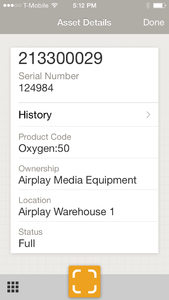
Use State shown as Status in TAMobile iOS

