
WARNING: The TrackAbout MetaWiki has been deprecated and is no longer being updated.
Please visit our new TrackAbout Knowledge Base at https://supportkb.trackabout.com for the most-up-to-date documentation on TrackAbout and TrackAbout Mobile.
Maintenance Tracking & Scheduling
Jump to navigation
Jump to search
Overview
The Maintenance Module enables the recording, tracking and reporting of maintenance actions and other procedures used in your business to manage your assets..
The Challenge:
- You have assets that require maintenance
- You need to track completed maintenance
- You need to know what preventative maintenance is coming due
- You need to ensure that established procedures or processes have been followed
- You need to know which standard was used in a certain procedure.
The Solution:
The Maintenance Module enables the recording, tracking and reporting of maintenance actions and other procedures used in your business to manage your assets..
By enabling the Maintenance module you can:
- Create a list of maintenance actions that will be displayed on the handhelds and can then be performed on your assets
- In this example the "Make Pack", "Handwheel", "Safety", "Shotblast" etc buttons are custom maintenance actions
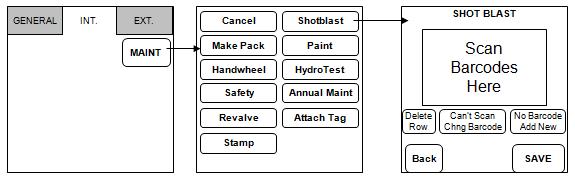

- Report on any completed maintenance
- Maintain an individual asset's maintenance history
When combined with the Dynamic forms module, the Maintenance module can also help you to:
- Establish step-by-step processes to follow for a given maintenance action you need to ensure that established procedures or processes have been followed
- Record extra information for each kind of maintenance work
- Enforce that all information is collected and that values are withing acceptable ranges.
Getting Started:
Track Maintenance Performed
- Create customized maintenance actions
- Record actions performed on assets
- Use Dynamic Forms to collect extra info during maintenance actions
- Report on actions performed
Track Maintenance Coming Due
- Create Asset Families to group your assets for maintenance
- Create Action Schedule for this Asset Family
- Report on maintenance coming due