
WARNING: The TrackAbout MetaWiki has been deprecated and is no longer being updated.
Please visit our new TrackAbout Knowledge Base at https://supportkb.trackabout.com for the most-up-to-date documentation on TrackAbout and TrackAbout Mobile.
Difference between revisions of "Maintenance Tracking & Scheduling"
Jump to navigation
Jump to search
| Line 41: | Line 41: | ||
=== Track Maintenance Coming Due === | === Track Maintenance Coming Due === | ||
| − | + | Client Configuration needs to be enable in the section: <br> | |
| + | '''Action Schedule Options ==> Using Action Schedules Feature = TRUE''' | ||
*Create Asset Families to group your assets for maintenance | *Create Asset Families to group your assets for maintenance | ||
*Create Action Schedule for this Asset Family | *Create Action Schedule for this Asset Family | ||
*Report on maintenance coming due | *Report on maintenance coming due | ||
Revision as of 16:59, 10 November 2010
Overview
The Maintenance Module enables the recording, tracking and reporting of maintenance actions and other procedures used in your business to manage your assets..
The Challenge:
- You have assets that require maintenance
- You need to track completed maintenance
- You need to know what preventative maintenance is coming due
- You need to ensure that established procedures or processes have been followed
- You need to know which standard was used in a certain procedure.
The Solution:
The Maintenance Module enables the recording, tracking and reporting of maintenance actions and other procedures used in your business to manage your assets..
By enabling the Maintenance module you can:
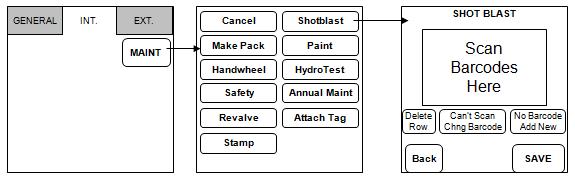
- Create a list of maintenance actions that will be displayed on the handhelds and can then be performed on your assets
- In this example the "Make Pack", "Handwheel", "Safety", "Shotblast" etc buttons are custom maintenance actions

- Report on any completed maintenance
- Maintain an individual asset's maintenance history
When combined with the Dynamic forms module, the Maintenance module can also help you to:
- Establish step-by-step processes to follow for a given maintenance action you need to ensure that established procedures or processes have been followed
- Record extra information for each kind of maintenance work
- Enforce that all information is collected and that values are withing acceptable ranges.
Getting Started:
Track Maintenance Performed
- Create customized maintenance actions
- Record actions performed on assets
- Use Dynamic Forms to collect extra info during maintenance actions
- Report on actions performed
Track Maintenance Coming Due
Client Configuration needs to be enable in the section:
Action Schedule Options ==> Using Action Schedules Feature = TRUE
- Create Asset Families to group your assets for maintenance
- Create Action Schedule for this Asset Family
- Report on maintenance coming due