
WARNING: The TrackAbout MetaWiki has been deprecated and is no longer being updated.
Please visit our new TrackAbout Knowledge Base at https://supportkb.trackabout.com for the most-up-to-date documentation on TrackAbout and TrackAbout Mobile.
Difference between revisions of "TrackAbout Activity"
Jump to navigation
Jump to search
| Line 1: | Line 1: | ||
== TrackAbout Activity == | == TrackAbout Activity == | ||
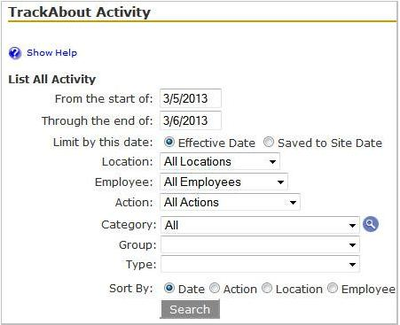
The TrackAbout Activity page lists all the records created during a specified date range. The results on this page can be limited and sorted by several different criteria: | The TrackAbout Activity page lists all the records created during a specified date range. The results on this page can be limited and sorted by several different criteria: | ||
| + | [[File:TrackaboutActivity.png|400px|right]] | ||
*Effective Date vs. Save to Site Date | *Effective Date vs. Save to Site Date | ||
| Line 13: | Line 14: | ||
**Type “TrackAbout Activity” in the Jump To Box. | **Type “TrackAbout Activity” in the Jump To Box. | ||
**Use the menu bar and go to Regular Maintenance > TrackAbout Activity.<br /> | **Use the menu bar and go to Regular Maintenance > TrackAbout Activity.<br /> | ||
| − | + | ||
*Make sure the date range includes the day you saved the records. | *Make sure the date range includes the day you saved the records. | ||
*Choose the Add New Assets action from the Action drop-down. | *Choose the Add New Assets action from the Action drop-down. | ||
Revision as of 12:19, 20 February 2015
TrackAbout Activity
The TrackAbout Activity page lists all the records created during a specified date range. The results on this page can be limited and sorted by several different criteria:

- Effective Date vs. Save to Site Date
- Location
- Employee
- Action
- Category/Group/Type/Product Code
View Add New Records
- Go to the TrackAbout Activity page:
- Type “TrackAbout Activity” in the Jump To Box.
- Use the menu bar and go to Regular Maintenance > TrackAbout Activity.
- Make sure the date range includes the day you saved the records.
- Choose the Add New Assets action from the Action drop-down.
- Click Search
- Click on the Effective Date link to see a detailed view of the record.
TrackAbout Activity
This page is a tool you can use whenever you need to find specific records within a specified time period. Common uses for this page include looking for recently synced records, or finding records where perhaps the delivery number was entered incorrectly. The results list includes links to the actual records, allowing you to view record details and make any corrections necessary.