
Please visit our new TrackAbout Knowledge Base at https://supportkb.trackabout.com for the most-up-to-date documentation on TrackAbout and TrackAbout Mobile.
Difference between revisions of "Use States"
| Line 11: | Line 11: | ||
| − | [[File:Use State Process Example.png|800px|center]] | + | [[File:Use State Process Example 2.png|800px|center]] |
| Line 17: | Line 17: | ||
Every action in TrackAbout changes some aspect about the assets scanned in the action. Some of these actions change the state of the asset, but other actions change other aspects of the asset but not its condition. For example, a Locate action changes the location of the asset, but it will not change the state of the asset, because simply moving the asset from one location to another does not change its state. In cases like this, the actions actually set a Use State of No Change, and whenever you view the asset, you will see the last Use State that was set on the asset. So if you unload an asset from a truck that is no longer ready for use, the Use State on the asset will still be Not Ready for Use In the table below, you can see the actions that typically change the Use State on an asset, and which do not. | Every action in TrackAbout changes some aspect about the assets scanned in the action. Some of these actions change the state of the asset, but other actions change other aspects of the asset but not its condition. For example, a Locate action changes the location of the asset, but it will not change the state of the asset, because simply moving the asset from one location to another does not change its state. In cases like this, the actions actually set a Use State of No Change, and whenever you view the asset, you will see the last Use State that was set on the asset. So if you unload an asset from a truck that is no longer ready for use, the Use State on the asset will still be Not Ready for Use In the table below, you can see the actions that typically change the Use State on an asset, and which do not. | ||
| + | |||
| + | |||
| + | {|border="1" style="border-collapse:collapse" class="wikitable" style="float:left; margin-right: 10px;" | ||
| + | '''Actions that typically set a Use State''' | ||
| + | ! style="text-align:left;"|Action | ||
| + | ! style="text-align:left;"|Use State | ||
| + | |- | ||
| + | |Add New Bulk Tank | ||
| + | |Delivered | ||
| + | |- | ||
| + | |Analysis | ||
| + | |Ready for Use | ||
| + | |- | ||
| + | |Condemn Assets | ||
| + | |Condemned | ||
| + | |- | ||
| + | |Delivery | ||
| + | |Delivered | ||
| + | |- | ||
| + | |Fill | ||
| + | |Ready for Use or Ready for Analysis | ||
| + | |- | ||
| + | |Locate Empty | ||
| + | |Not Ready for Use | ||
| + | |- | ||
| + | |Locate Full | ||
| + | |Ready for Use | ||
| + | |- | ||
| + | |Maintenance In House | ||
| + | |The Use State is determined by the maintenance action completed | ||
| + | |- | ||
| + | |Receive From Vendor | ||
| + | |Ready for Use | ||
| + | |- | ||
| + | |Sell Assets | ||
| + | |Sold | ||
| + | |- | ||
| + | |Sort Assets | ||
| + | |Empty, Sorted | ||
| + | |- | ||
| + | |Sort Trip | ||
| + | |Committed for Delivery | ||
| + | |- | ||
| + | |} | ||
| + | |||
| + | {|border="1" style="border-collapse:collapse" class="wikitable" style="float:right; margin-left: 10px;" | ||
| + | '''Actions that typically do not set a Use State''' | ||
| + | !Action | ||
| + | |- | ||
| + | |Add New | ||
| + | |- | ||
| + | |Branch Transfer | ||
| + | |- | ||
| + | |Check Retest Date | ||
| + | |- | ||
| + | |Customer Audit | ||
| + | |- | ||
| + | |Edit Asset | ||
| + | |- | ||
| + | |Load Truck | ||
| + | |- | ||
| + | |Locate | ||
| + | |- | ||
| + | |Maintenance At Customer | ||
| + | |- | ||
| + | |Reclassify | ||
| + | |- | ||
| + | |Replace Barcode | ||
| + | |- | ||
| + | |Set Expiration Date | ||
| + | |- | ||
| + | |Set Ownership | ||
| + | |- | ||
| + | |Set Serial Number | ||
| + | |- | ||
| + | |Unload Truck | ||
| + | |- | ||
| + | |} | ||
| + | |||
| + | |||
===Finding Use States=== | ===Finding Use States=== | ||
Revision as of 12:09, 2 January 2015
What are Use States?
A Use State describes the status or condition of an asset. Sometimes called a Status, a Use State is assigned to every active, barcoded asset in TrackAbout, based on the last action that happened to that asset. For example, assets that were delivered to a customer would have a use state of "Delivered", while assets that had just been filled or cleaned would have a use state of "Ready for Use".
Why use Use States?
Used with the reports available in TrackAbout, use states provide another level of insight into your asset inventory by showing how many assets are in each step of the asset life cycle. In some TrackAbout modules, use states are also used to force assets to go through a specific process by by only allowing assets with certain use states to be valid for certain actions.
How Assets Change Use States

In the example above, you can see that each action results in a Use State that stays on the asset until the next action occurs. Filled goes to Ready for Use, Load Truck goes to Committed for Delivery and so on. Add New and Unload Truck are different though, because they each set a Use State of "No Change" on the assets.
Every action in TrackAbout changes some aspect about the assets scanned in the action. Some of these actions change the state of the asset, but other actions change other aspects of the asset but not its condition. For example, a Locate action changes the location of the asset, but it will not change the state of the asset, because simply moving the asset from one location to another does not change its state. In cases like this, the actions actually set a Use State of No Change, and whenever you view the asset, you will see the last Use State that was set on the asset. So if you unload an asset from a truck that is no longer ready for use, the Use State on the asset will still be Not Ready for Use In the table below, you can see the actions that typically change the Use State on an asset, and which do not.
| Action | Use State |
|---|---|
| Add New Bulk Tank | Delivered |
| Analysis | Ready for Use |
| Condemn Assets | Condemned |
| Delivery | Delivered |
| Fill | Ready for Use or Ready for Analysis |
| Locate Empty | Not Ready for Use |
| Locate Full | Ready for Use |
| Maintenance In House | The Use State is determined by the maintenance action completed |
| Receive From Vendor | Ready for Use |
| Sell Assets | Sold |
| Sort Assets | Empty, Sorted |
| Sort Trip | Committed for Delivery |
| Action |
|---|
| Add New |
| Branch Transfer |
| Check Retest Date |
| Customer Audit |
| Edit Asset |
| Load Truck |
| Locate |
| Maintenance At Customer |
| Reclassify |
| Replace Barcode |
| Set Expiration Date |
| Set Ownership |
| Set Serial Number |
| Unload Truck |
Finding Use States
The use state of an asset can be viewed on both the TrackAbout website and in the asset lookup feature on any of the TrackAbout Mobile platforms (TAMobile 6, TAMobile Android, TAMobile iOS).
Use States on the Website


Use States on Mobile Platforms
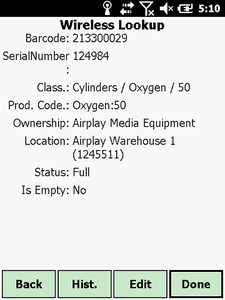
Use State shown as Status in TAMobile 6
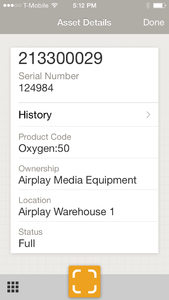
Use State shown as Status in TAMobile iOS

